
How to Build an AI-Ready Creative Team
The clearest way to build an AI-ready creative team is to train people around the work they actually do.
That sounds obvious, but it’s not how most companies approach AI.
We often see teams roll out the same tools and training to everyone, then wonder why adoption is uneven. A copywriter, designer, strategist, and project manager are not solving the same problems. They should not be expected to use AI in the same way.
The better place to start is with the work itself.
Where is the team losing time? Where are people repeating the same tasks? Where do projects tend to get stuck? What do people wish they had more time to focus on?
Those questions usually reveal more than a generic AI training program ever will.
The goal is not to make everyone an expert in every tool. It is to help each function use AI in ways that make the work better.
Train Each Function Differently
The people doing the work usually know where the friction is.
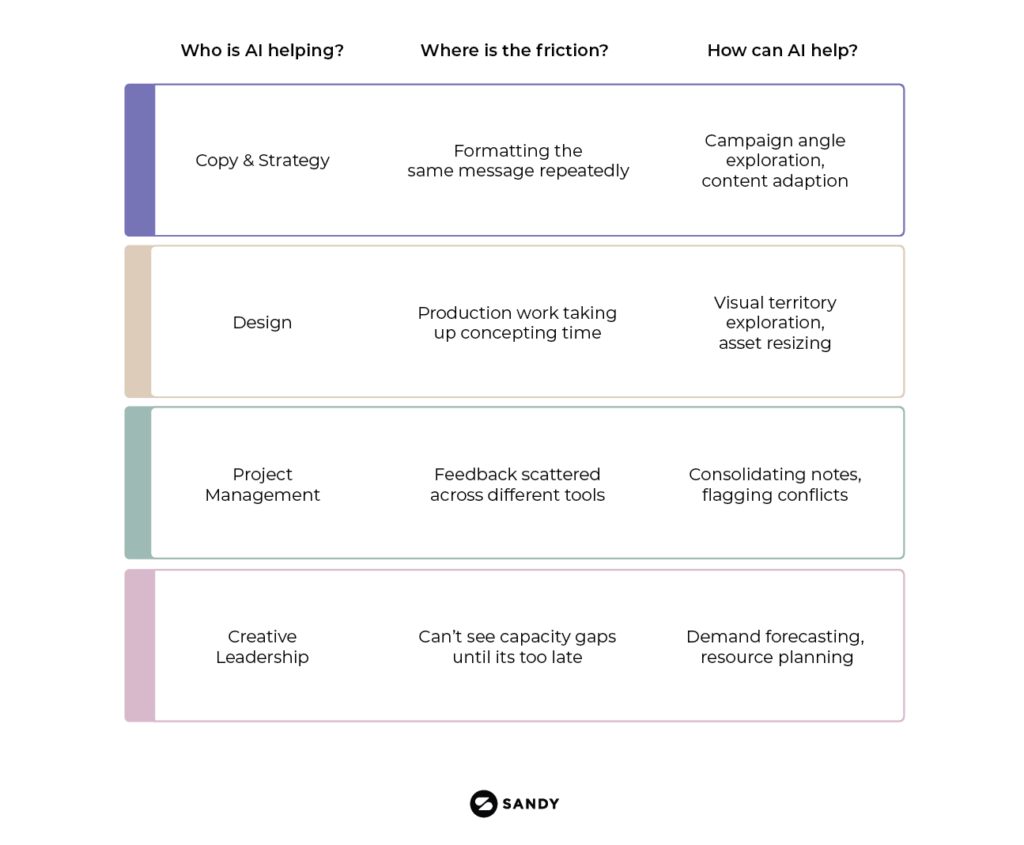
A writer knows when they are spending too much time turning the same message into ten different formats. A designer knows when production work is taking time away from concept development. A project manager knows when feedback is scattered across Slack, email, presentations, and meeting notes.
That’s where training should begin.
Rather than showing the whole team a list of features, ask each function what slows them down. Then build training around real use cases.
That also makes adoption more natural. People are more likely to use AI when it solves a problem they already have.
Copy, Content, and Strategy
For writers and strategists, AI can be useful much earlier in the process. It can help organize research, summarize interviews, explore different ways into a brief, adapt content for different audiences, or develop a stronger first draft.
A copywriter might use AI to explore several campaign angles before deciding which one feels most relevant. A strategist might use it to pull recurring themes from a large set of customer interviews. A content team might turn a research report into social posts, emails, presentation content, and sales materials without losing the main idea.
That doesn’t mean accepting whatever AI produces.
The writer still needs to understand the audience, protect the brand voice, and recognize when something feels generic or off-brand.
Another useful application is synthetic research.
Teams can use AI-generated audience profiles to explore how different groups might respond to a message or idea. This can help compare campaign directions, expose weak assumptions, or highlight where a concept may be confusing.
For example, a team might have two strong campaign territories but only enough time and budget to develop one. Synthetic research can provide an early signal about which direction deserves more attention.
It shouldn’t replace real customer feedback, but it can help teams narrow the options before investing in formal research or full production.
Design and Production
The opportunity for designers is different.
AI can help with early visual exploration, mood boards, image variations, layout directions, production adaptation, and repetitive tasks such as resizing or extending assets.
A designer might use AI to explore three visual territories quickly, then spend more time developing the strongest one.
A production team might use it to adapt approved creative across dozens of formats rather than rebuilding every asset manually.
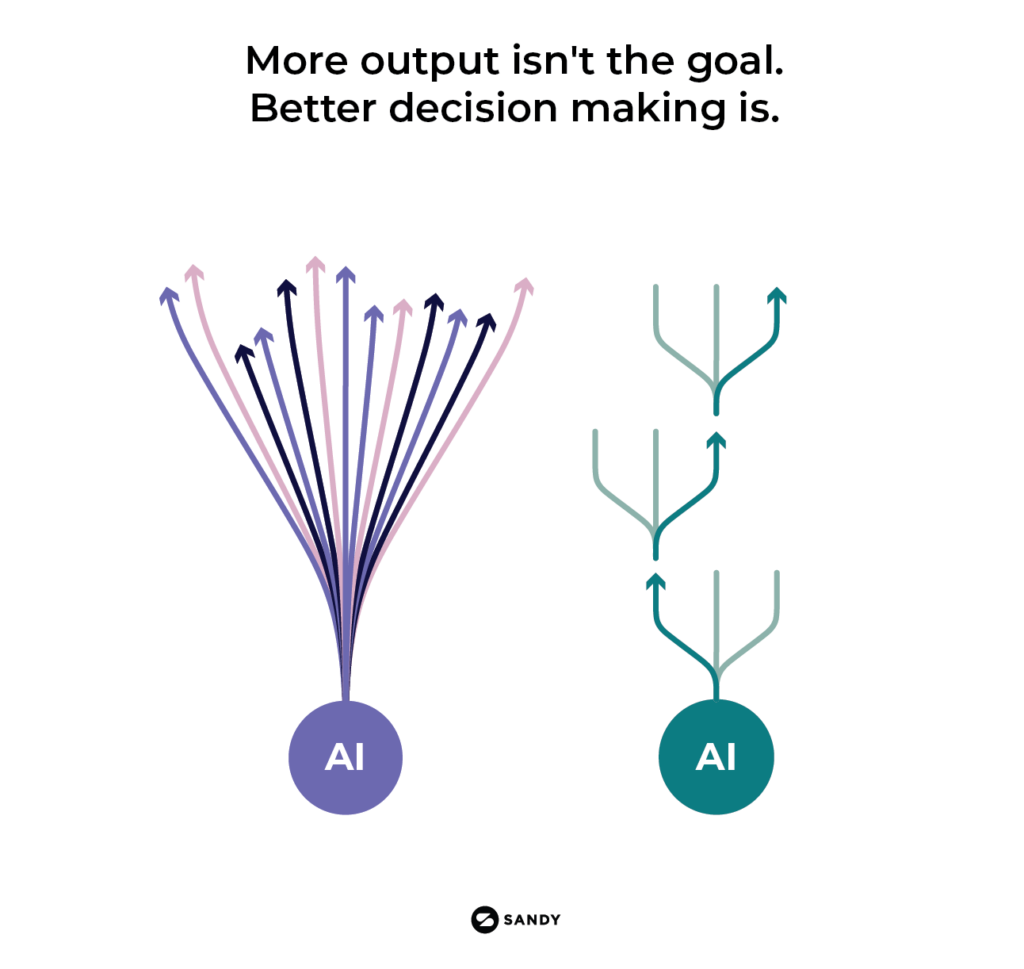
That’s useful, but creative leaders need to be careful not to confuse more output with success.
More concepts can create more work if there is no clear way to evaluate them. Most creative teams already struggle with too many options and too many opinions.
The real value is not generating twenty directions. It is helping the team get to the right direction earlier.
Teams can also use synthetic research to explore whether a visual idea is easy to understand, whether the product benefit is coming through, and whether the messaging and imagery are working well together.
It won’t tell you what the final creative should be. But it can help the team identify problems before spending days refining the wrong idea.
Project Management and Creative Operations
For project managers and creative operations teams, AI can remove a lot of the administrative weight that builds up around creative work.
It can turn a kickoff meeting into a clear set of responsibilities and next steps. It can organize scattered feedback, flag conflicting comments, and help teams track dependencies before they become problems.
Anyone who has managed a review with comments arriving through Slack, email, a presentation, and a live call will understand the value of that.
AI can also help creative operations leaders see patterns across the business.
Maybe projects keep arriving without clear briefs. Maybe the same approval stage adds three days to every timeline. Maybe the team repeatedly needs motion support but never has enough capacity.
Those patterns can be difficult to spot when everyone is focused on getting the next project out the door.
Used well, AI can help teams identify where the process itself needs attention.
What This Means for Creative Leaders
For creative leaders, the biggest opportunity is visibility.
AI can help compare upcoming demand against current team capacity, identify missing capabilities, and show where projects are likely to get stuck.
A leader may see that the team has enough design support for a launch but not enough motion, production, or project management capacity. Seeing that earlier means they can adjust scope, shift priorities, bring in support, or reset expectations before the team becomes overloaded.
It also makes resourcing conversations more specific.
Instead of simply saying the team is stretched, leaders can show where demand is increasing, which skills are missing, and what the likely impact will be.
AI Does Not Replace Specialists
There is a temptation to think AI will allow one person to cover every creative need.
We don’t believe that’s where we’re heading.
AI may help people do more, but it also makes specialist judgment more important.
A strong designer will make better decisions with AI-generated imagery. A strategist who understands the customer will ask better questions of synthetic audiences. A writer with a clear sense of voice will know when the output feels generic or off-brand.
The strongest model will combine a core internal team with flexible access to specialist talent when the work requires it.
That might mean bringing in a motion designer for a launch, a strategist for a new audience challenge, or a production specialist to scale a campaign across markets.
The point is not to add more people. It is to match the right capability to the work at the right time.
Build AI Into Real Workflows
AI creates the most value when it becomes part of a real process.
Take something the team already does, such as developing a campaign, managing feedback, or adapting content across channels.
Map where time is being lost and where the same problems keep showing up. Then decide where AI can help.
It might support research at the beginning, concept development in the middle, or repetitive production at the end.
But human review still matters. Someone needs to confirm the accuracy, quality, originality, and strategic fit of the work.
Without that, AI can simply help teams move faster in the wrong direction.
Give People Clear Guardrails
Teams need to know which tools are approved, what information can be used, what requires review, and where the risks are.
That includes confidential information, intellectual property, factual accuracy, brand standards, and usage rights.
The guardrails need to be practical.
If they are too vague, everyone will make different decisions. If they are too restrictive, people may experiment quietly without sharing what they are doing.
We found that regular working sessions are often more useful than one large training session.
Let people show how they used AI on a real project. Talk about what worked, what failed, and what they would do differently next time.
That is how useful practices spread through a team.
Start Small
Teams do not need to redesign everything at once.
Choose a few real problems. Involve the people doing the work. Test each use case on a live project.
Then ask what actually happened.
Did it save time? Did it improve the work? Did it reduce revisions? Did it create more output but also more review?
Build from those answers.
The Teams That Get This Right
Becoming AI-ready is not about building the smallest possible creative team or chasing every new tool.
It is about helping people work more effectively, giving leaders better visibility, and making it easier to add the right capabilities as the work changes.
The teams that get the most from AI will not necessarily be the ones using the most tools. They will be the ones that understand where AI adds value, where people add value, and how to bring both together around the work.
That may mean helping your existing team build new capabilities. It may also mean bringing in a specialist who can fill a specific gap, support a critical launch, or help establish better AI-enabled workflows.
At Sandy, we can help you build flexible teams of AI-ready creative and marketing talent. Whether you need added capacity or specialized expertise, we help you bring in the right support without adding unnecessary fixed overhead, so your core team can stay focused on the work that matters most.